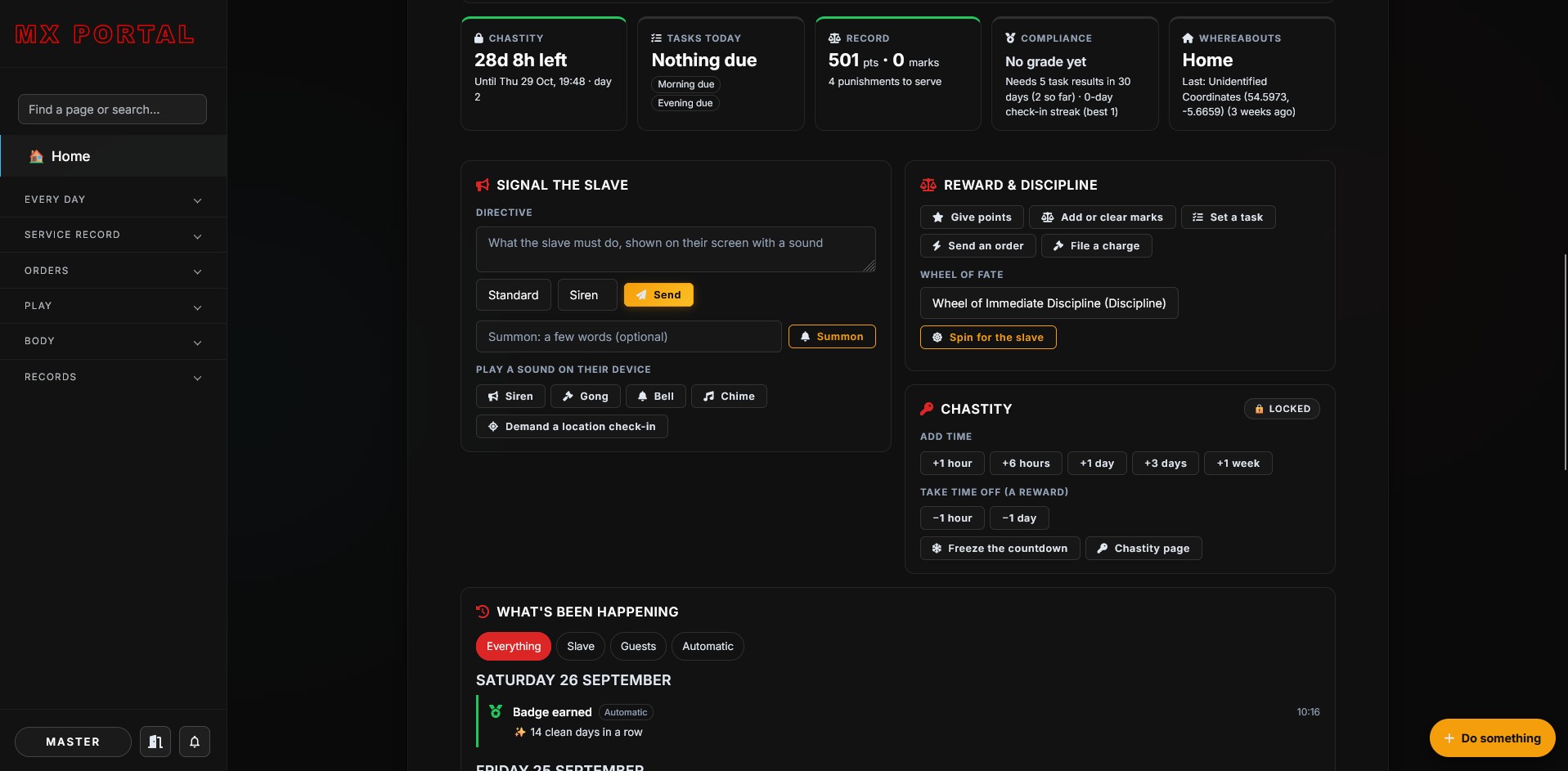
Although this slave has not been active in finding a new Master recently, this slave has been spending its time productively. The slave’s last few Master’s always used to talk about how useful an app or portal would be but every time this slave started to make one other things would get in the way and he would redirect the slave to focus on those.
The portal was initially just going to be a simple ‘check in’, tasks and rules type thing. This slave decided that it would be a good use of time to finish developing the system it has been working on for the last 10 years or so while in between Masters. Only thing is, the slave got a bit carried away and has spent the last five or six years developing what turned out to be a bit of monster. Partly because technology moves on. It includes way more features than the slave intended but will hopefully be used in the future.
The portal is about 47,000 lines of code, 6,000 of them visual styling. It has 38 sections, about 160 database tables and around 470 separate actions people can take. There are also 50 test files with nearly 1,200 automated checks to help with development.
There are Master, Slave and guest versions of the portal with unique features and access rights. The slave was of the opinion that it would include as many features as it could so that any future Master would find at least some things useful. The portal is modular so new sections and features can be added.
Over the next few weeks the slave be migrating some of the menu links here, such as the rules, to go to the portal site because it makes sense for them to be in one place to avoid errors etc.
As an aside, the slave does tend to get a bit carried away when adding features to projects. For example, this site has a full on 90s mode that even displays the images in 90s style 256 colours. (click the menu, sun icon on the right to go to light mode then the same button again to go to 90s mode).
Here is the main feature set that the slave created while developing the portal:
-
Home and daily running
- Master’s Home: what needs a decision now, live signals, a quick “Do something” button, a morning brief, a monthly report card and Insights.
- The slave’s Home: the whole day as one Today list, with each item done right there.
- Desk: the inbox of decisions, standing instructions, mood and automations.
- Private chat with voice notes.
- Check-ins (morning and evening), tasks, chores, routines, rituals and a calendar.
- Protocol modes (Everyday, High protocol, Out in public, Holiday) and a discreet mode.
Service record
- Points and marks, punishments and appointments to serve them, contracts, exams, trials, and a full history.
- Training programmes with stages and sign-offs.
- Levels of trust that unlock privileges as they rise.
- Privileges: what the slave may or may not do right now.
- Profile: measurements, chastity, plugs, piercings and tattoos, with records over time.
- Year in review, with favourite moments, milestones and a PDF.
Orders
- Surprise orders, the menu, inspections, dress code, confessions and bookings.
Play
- Games: wheels, dice, card decks, bounties, crates, hunts, truth or dare, bets and more.
- Connected IoT toys: control them remotely, with patterns, toy orders and the slave’s own limits.
- Gear: where things are kept, cleaning and batteries.
- Live sessions, video calls and the scene planner.
Body
- Chastity: locks, timers, freezes and an estimated release date.
- Orgasm control calendar: a plan, begging, lotteries and logged edging sessions.
- Location: check-ins, places, curfew.
- Humiliation: the Wall of Shame and messages from guests.
Records and safety
- A rulebook and agreement, with certificates.
- Limits and activities.
- Consent & Safety:
- the safeword (pauses everything at once);
- switches Master can turn off, such as alerts or connected toys;
- consent can be withdrawn and limits renegotiated;
- a full consent log.
- Guests: controlled access for visitors, with their own safety line.
Across the portal
- Automations: rules that react to events, with conditions, delays and escalation.
- Camera proof stamped with a fresh code word, so old photos can’t be reused.
- Works offline: actions done without a signal are sent later, at the time they happened.
- Installs as a phone app, with push notifications.
- Light and dark modes.
- Search across everything.
- PDF exports.
- Starter packs to set it up quickly.
- Backups and a hand-over between devices.